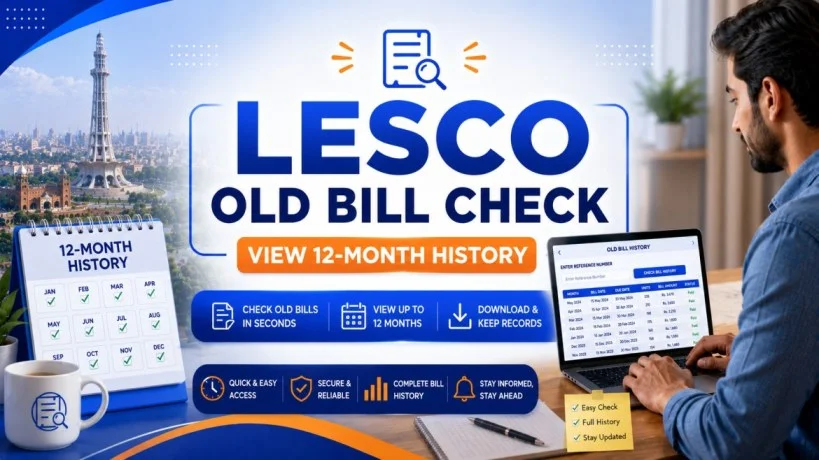
LESCO Old Bill Check 2026 – Secure Access 12-Month History & Previous Bills Online
LESCO old bill check, You need an electricity bill for school admission. Or your bank is asking for proof of residence. Or you are trying to track why your consumption went up last summer. Or you simply lost your last month’s bill and need a duplicate. Whatever the reason, your old LESCO bills are not lost. They are all stored online, accessible in seconds, and free to download.
This guide shows you exactly how to access your complete LESCO bill history — up to 12 months of old bills, payment records, consumption patterns — in under two minutes. You will learn what information each bill contains, how to download it as a PDF, when old bills are useful for official purposes, and how to retrieve your reference number if you have lost all your bills.
What Information is Stored in Your LESCO Bill History?
When you check your old bills online, LESCO’s system displays 12 months of complete billing records. This is not just a list of numbers — each bill entry contains critical information about your consumption, payments, and account status.
Information in Each Monthly Bill Record
For every month shown in your history, you can see:
| Field | What It Tells You |
|---|---|
| Billing Month | Which month the bill covers (e.g., May 2025) |
| Units Consumed | How many kilowatt-hours (kWh) you used that month |
| Bill Amount | Total charges for that month (before payment) |
| Payment Status | Paid, Unpaid, or Partially Paid |
| Payment Date | When you paid (if applicable) |
| Amount Paid | How much you actually paid |
| Current Balance | Money you owe (if unpaid) |
By viewing 12 months of this data, you can:
- Identify seasonal patterns — Summer months (May-August) typically have higher consumption due to air conditioning
- Spot unusual spikes — If June shows 2x normal consumption, something changed (guest visit, broken AC, new appliance)
- Track your payment history — Proof of on-time or late payments
- Calculate annual costs — Total electricity expense for tax or budgeting purposes
Information in Your Full Bill Details
When you click on a specific month’s bill, the complete bill opens with:
- Your 14-digit Reference Number (your permanent LESCO account code)
- Consumer Name and Address (as registered with LESCO)
- Meter Number (the ID of your physical electricity meter)
- Previous Month’s Balance (if any amount was carried forward)
- Consumption (units used, meter reading date)
- Rate Breakdown — Charges per slab (different prices for first 300 units vs. above 300)
- Fuel Price Adjustment (FPA) — Government-mandated adjustment added to bills
- Taxes and Duties — Income tax (on bills above certain amounts), electricity duty
- Late Payment Surcharges — If you paid after the due date
- Total Amount Due — Your final bill
- Due Date — Last date to pay without penalty
Why this matters: Your old bills are not just records — they are proof documents. Every field on a bill can be used for official purposes: address verification, income documentation, payment proof, consumption tracking.
How to Check Your LESCO Old Bills Online (5 Methods)
You have five ways to access your old bills. Choose the one that fits your situation.
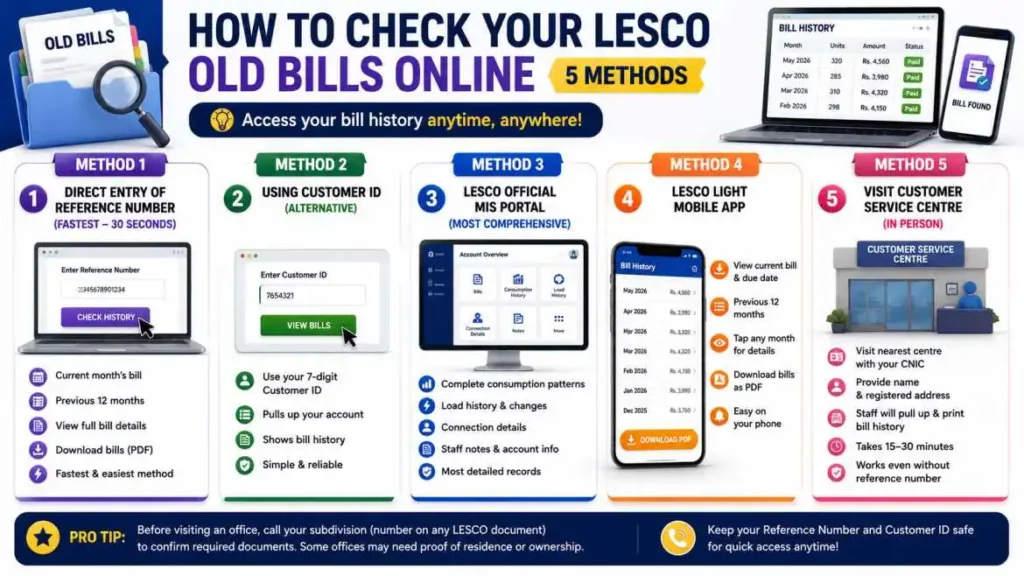
Method 1: Direct Entry of Reference Number (Fastest – 30 seconds)
Visit any of these websites:
- lesco-online.com.pk
- lescobilling.pk
- lescoebillonline.pk
- billcheckpk.com
- lesco.net.pk
Find the box labeled “Enter Reference Number” or “Check Bill” Type your 14-digit Reference Number (without spaces or dashes). Click “Check History” or “Generate Bill.”
The system displays:
- Your current month’s bill
- A table of the previous 12 months
- Option to click any month to see full bill details
This is the fastest method if you have your reference number handy.
Method 2: Using Customer ID (Alternative to Reference Number)
If you have lost your reference number, you can use your 7-digit Customer ID instead. This number is also printed on your bill (usually near the top, after “Customer ID:”).
Same websites as Method 1. Enter your Customer ID instead of Reference Number. The system pulls up your account and bill history.
Method 3: LESCO Official MIS Portal (Most Comprehensive)
Visit the official LESCO Management Information System (MIS) portal. You will need to:
- Navigate to the “View Bills” or “Check Consumer Records” section
- Enter your Reference Number or Customer ID
- Log in with your CNIC (if required)
The MIS portal shows not just bills, but also:
- Complete consumption patterns over multiple years (not just 12 months)
- Load history (any changes to your meter capacity)
- Connection details (when you got your connection, who it is registered to)
- Any notes from LESCO staff about your account
This is the most detailed view of your account records.
Method 4: LESCO LIGHT Mobile App
Download the official LESCO LIGHT app from Google Play Store or Apple App Store.
- Open the app
- Tap “Bill Check” or “View Bills”
- Enter your Reference Number
- Tap “Submit”
The app displays:
- Current month’s bill with due date
- Previous 12 months in a scrollable list
- Tap any month to see full bill details
- Download button to save bills as PDF
This method is convenient if you use your phone for most tasks.
Method 5: Visit LESCO Customer Service Centre in Person
If you have no internet access or have lost your reference number and cannot find it online:
- Visit your nearest LESCO Customer Service Centre with your CNIC
- Tell the staff: “I want to view my old bills and check my account history”
- Provide your name and address as registered with LESCO
- Staff will pull up your account and print your bill history if needed
This method takes 15-30 minutes but guarantees you will get your information even if you have no reference number.
Pro tip:
Before visiting an office, call your subdivision (number on any LESCO document) to confirm what documents you need. Some offices may require proof of residence or ownership as well.
Understanding Your 12-Month Bill History Table
When you check your old bill, you will see a table like this:
| Month | Units | Bill Amount | Payment Status | Amount Paid | Balance |
|---|---|---|---|---|---|
| May 2025 | 380 | Rs 6,500 | Paid | Rs 6,500 | 0 |
| April 2025 | 420 | Rs 7,200 | Paid | Rs 7,200 | 0 |
| March 2025 | 290 | Rs 4,800 | Paid | Rs 4,800 | 0 |
| Feb 2025 | 210 | Rs 3,500 | Unpaid | 0 | Rs 3,500 |
| Jan 2025 | 180 | Rs 3,000 | Paid | Rs 3,000 | 0 |
How to Read This Table
Units Column:
This is your electricity consumption in kilowatt-hours (kWh). Notice May has 380 units (summer, high AC use) while January has only 180 units (winter, no AC).
Bill Amount Column:
Total charges for that month. Higher units = higher bill (usually). But note: February has lower units (210) but only Rs 3,500 bill, while March has 290 units for Rs 4,800. The difference is due to FPA (fuel price adjustment) changes.
Payment Status Column:
- Paid = You paid on time or within grace period
- Unpaid = You did not pay; amount is pending
- Partially Paid = You paid some but not all of the bill
Amount Paid Column:
How much money you actually sent to LESCO. If the bill was Rs 6,500 but you only paid Rs 6,000, this column shows Rs 6,000.
Balance Column:
Money you still owe. If you did not pay a bill, this column shows the unpaid amount. In February’s example above, Balance is Rs 3,500 — meaning you still owe that amount from that month.
Important:
If you see unpaid bills older than 3 months with outstanding balances, LESCO may disconnect your connection without notice. Check for any old unpaid bills in your history immediately.
How to Download and Print Your Old LESCO Bills
Once you have opened your bill history, downloading and printing is simple.
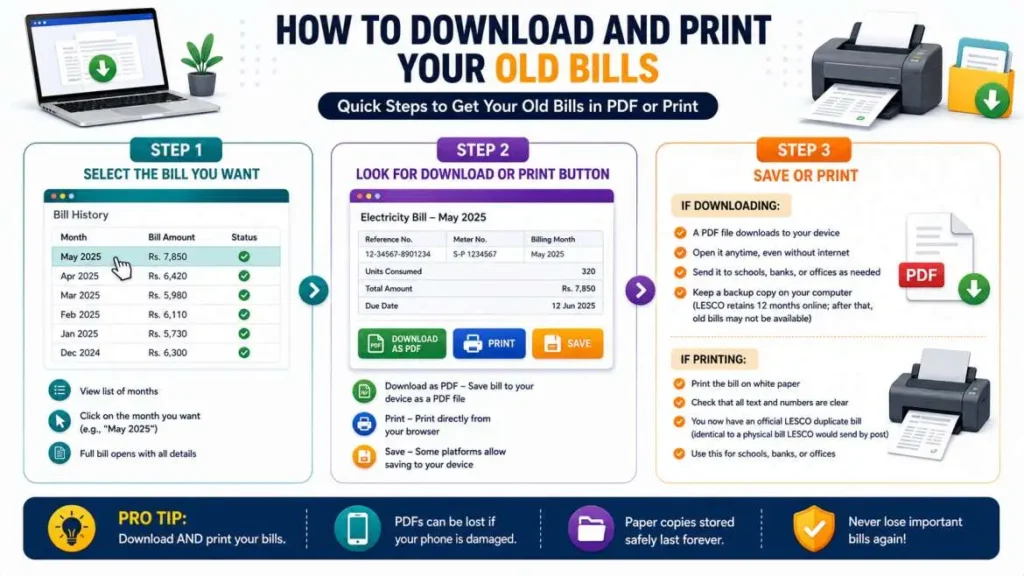
Step 1: Select the Bill You Want
On the bill history page, you will see a list of months. Click on the month you want to download (e.g., “May 2025”).
The full bill opens, showing all details.
Step 2: Look for Download or Print Button
On the bill page, you will see options like:
- “Download as PDF” — Saves bill to your phone or computer as a PDF file
- “Print” — Opens print dialog to print directly from your browser
- “Save” — Some platforms allow saving to your device
Click the option you need.
Step 3: Save or Print
If downloading:
- A PDF file downloads to your device
- You can open it anytime, even without internet
- Send it to schools, banks, or offices as needed
- Keep a backup copy on your computer (LESCO retains 12 months online; after that, old bills may not be available)
If printing:
- Print the bill on white paper
- Check that all text and numbers are clear
- You now have an official LESCO duplicate bill (identical to a physical bill LESCO would send by post)
- Use this for schools, banks, or offices
Pro tip:
Download AND print your bills. PDFs can be lost if your phone is damaged. Paper copies stored safely last forever.
Using Old LESCO Bills for Address Proof and Documentation
Your LESCO bill is one of Pakistan’s most widely accepted documents for proof of residence and official documentation.
Schools and Educational Institutions
Schools often ask for address proof during enrollment. A LESCO bill showing your name and address is accepted at most schools.
What schools need:
- Your current or recent LESCO bill (usually from the last 3 months)
- Clear name and address printed on it
- Must match the address you are providing in school forms
Caution:
If you recently moved and your LESCO bill shows an old address, some schools may ask for other proof or a new bill. Request an address correction from LESCO if needed.
Banks and Financial Institutions
Banks require address proof when opening accounts, applying for loans, or processing documents.
What banks need:
- LESCO bill from the last 3-6 months
- Name on bill must match your account name exactly
- Address must be clear and match your ID card
Passport and Government ID Applications
When applying for a Pakistani passport or renewing your CNIC, you will need address proof.
LESCO bill is accepted for:
- Original passport application
- Passport renewal
- CNIC address correction
- Driver’s license applications
Tenancy and Rental Agreements
If you are renting a property and your landlord asks for your electricity bill as part of tenancy verification:
- Download your LESCO bill
- Show the address matches the rental property
- This proves you are the account holder for that address
Tax Documentation and Income Proof
For tax filing or income verification:
- Your 12-month bill history shows annual electricity expense
- Can be submitted to accountants or tax advisors
- Useful for business expense tracking
- Some subsidies or government programs ask for electricity bills to verify residence
Important caveat: When using LESCO bills as address proof, ensure:
- Your name on the bill matches your CNIC exactly
- The address is current (not outdated)
- The bill is from the last 3-6 months (older bills may be rejected)
- Print/download the OFFICIAL bill from LESCO’s system, not a photo or screenshot
Finding Your Reference Number if You Have Lost All Bills
If you have lost all your physical bills and cannot access any online bill, you can still retrieve your Reference Number.
Method 1: Use Any Old Bill You Can Find
Even a bill from 2 years ago works. The Reference Number never changes. Find the 14-digit number in the top-left corner. That is your permanent account number.
Method 2: Register Your CNIC with LESCO Online
Visit the official LESCO website (lesco.gov.pk) and look for a section like “CNIC Registration” or “Find Your Reference Number.”
- Enter your CNIC number (13 digits)
- Select your subdivision if prompted
- The system displays your Reference Number
- Use this to access your bills
Method 3: Contact LESCO by Phone
Call the LESCO helpline 118 (works 24/7, no area code needed).
- Tell them: “I want to find my LESCO Reference Number”
- Provide your name, address, and CNIC
- The agent will verify your identity and give you your Reference Number over the phone
- Note it down immediately
Method 4: Visit a LESCO Customer Service Centre
Bring your CNIC and visit any LESCO office. Staff will:
- Verify your identity with your CNIC
- Pull up your account in their system
- Provide your Reference Number and optionally print your recent bills
This method takes 15-30 minutes but guarantees accurate information.
Why reference numbers never change:
When LESCO creates your connection, your Reference Number is permanently assigned. It does not change if you move, change the meter, or update your account details. Your number identifies your physical meter location and account permanently.
What to Do If Your Old Bill Shows Wrong Information
If you review your old bills and notice an error, document it and escalate.
Billing Errors You May Find
Wrong Units Recorded:
Example: June 2025 shows 500 units, but you know you were away that month with AC off. Check your meter reading in person on the billing date. File a complaint through CCMS.
Wrong Charges:
Example: Your bill jumped 50% with no explanation. Cross-check the units (did they go up?) and FPA (did government add charges?). If units are the same but charges increased, file a complaint.
Unpaid Bills You Actually Paid:
Example: Your old bill shows “Unpaid” status but you remember paying it. Retrieve your bank receipt or payment proof. Contact LESCO to correct the status.
Address Issues:
Example: Your old address is still shown on bills after you corrected it. File a name/address correction request through the ENC portal or LESCO office.
How to Report and Fix Errors
- File a formal complaint via CCMS portal (ccms.lesco.gov.pk) with old bill screenshot or PDF as evidence
- Call 118 and describe the error, reference the specific month and bill amount
- Visit your subdivision office with the printed bill and your evidence (meter photo, payment receipt, etc.)
Do not ignore errors. Unpaid bills accumulate surcharges and can lead to disconnection. Overbilling errors mean you are overpaying.
How Long LESCO Keeps Your Bill History
LESCO stores your bill history online for varying periods:
| Data Retention | Duration |
|---|---|
| Recent bills (current month) | Always available online |
| Previous 12 months | Guaranteed access (all websites) |
| 13-24 months old | Available via LESCO MIS portal (some retain longer) |
| 2+ years old | May not be available online; request from LESCO office |
Best practice:
Download and save your bills as PDF every 3-6 months. Do not rely on LESCO’s online system for permanent storage. Your old PDFs can be accessed anytime, even decades later, without internet.
LESCO MIS Portal – Access Complete Account Records
For deeper access to your account history beyond 12 months, use the official LESCO MIS (Management Information System) portal.
What the MIS Portal Offers
The MIS portal (accessed through lesco.gov.pk or LESCO LIGHT app) shows:
- Multi-year consumption history (not just 12 months)
- Load history — any changes to your meter capacity or connection type
- Payment history — complete record of every payment made
- Account status — active, suspended, disconnected, etc.
- Meter history — when your meter was installed, any replacements
- Service requests — any applications you submitted (new connections, load increases, name changes)
This is the most complete record available to consumers.
How to Access the MIS Portal
- Visit lesco.gov.pk
- Look for “MIS Portal” or “Consumer Portal”
- Register with your Reference Number and CNIC
- Log in and navigate to “View Consumer Records” or similar
- You can now view your complete account history
Frequently Asked Questions (FAQs)
Final Thoughts
Your LESCO bill history is a treasure trove of data. Every month’s bill is a snapshot of your electricity consumption, payment behavior, and account status. By checking your old bills, you understand your usage patterns (when you use most power), identify overpayments or errors, and access official documents for schools, banks, and government agencies.
The process is free, instant, and simple: enter your Reference Number once, and 12 months of records appear. Download and save them. You will never again be caught without proof of residence, unable to track an overbilled month, or unable to provide documentation when asked.
Start today. Check your bill history. Download your last 6 months of bills to your computer. Keep them safe. You have just created a permanent record that proves your identity, address, and payment history — all from your electricity account.
This consumption and payment history is pulled directly from LESCO’s official billing system. You can also verify your account details directly on the official LESCO website.