LESCO Online Bill Check 2026
Check Your LESCO Bill
Choose how you’d like to search
Instantly view, download, and print duplicate electricity bills. Enter your reference number and get your bill in seconds.
LESCO bill check is the process of viewing, downloading, or printing your Lahore Electric Supply Company electricity bill using your 14-digit reference number or 7-digit Consumer ID, without waiting for the paper copy to reach your home. It matters if you’ve lost your physical bill, moved to a new address, need a duplicate copy for a bank or visa application, or simply want to confirm your due amount before the payment deadline. Enter your reference number or Consumer ID in the box above to pull up your bill right away, or keep reading for every other method LESCO offers, how to read the charges on your bill, and what to do when the system won’t pull up your record.
⚠️Warning: Don’t share your full reference number or bill screenshots publicly. Anyone with that number can view your consumption history and personal billing details.
Who Needs to Check Their LESCO Bill Online?
Any LESCO consumer with an active electricity connection in Lahore, Kasur, Sheikhupura, Okara, or Nankana Sahib districts can check their bill this way, residential, commercial, agricultural, or industrial. You don’t need to be the account holder listed on the bill, and there’s no registration, login, or app installation required. It’s completely free.
What you need:
Your 14-digit Reference Number
Or
Your 7-digit Consumer ID
What won’t work:
1. Your name
2. Your CNIC
3. Your house address
4. Your meter number
LESCO’s system doesn’t index bills by any of those, for privacy reasons, so the reference number or Consumer ID is the only way in.
How Do You Check Your LESCO Bill Online?
The fastest way to check your LESCO bill is right above, using the tool at the top of this page, which connects to the same billing database as the official portal at lesco.gov.pk and the shared PITC system at bill.pitc.com.pk that powers all 11 electricity distribution companies in Pakistan. You don’t need to leave this page, just enter your reference number or Consumer ID above and your bill will load.
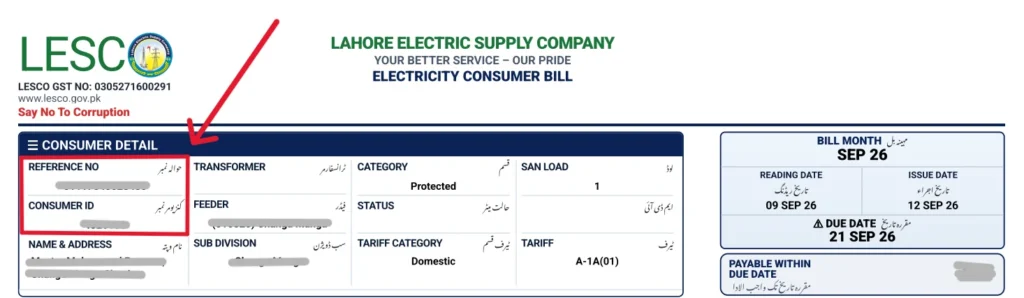
Method 1: Check LESCO Bill by Reference Number
The Reference Number is the 14-digit code printed in a boxed field labeled “Reference No.” near the top-left of any past LESCO bill.
Your current month’s bill should load within a few seconds, showing the payable amount, due date, units consumed, and a “Print Bill” or “Download PDF” button.
💡Tip: If your bill hasn’t updated for the current month yet, the tool will usually show your last generated bill instead. LESCO typically finalizes each month’s billing cycle between the 1st and 10th, depending on your meter reading date.
Method 2: Check LESCO Bill by Consumer ID (7-Digit)
The Consumer ID, sometimes called Customer ID or Customer Number, is a shorter 7-digit identifier printed alongside the reference number on the same bill.
This method works exactly the same as the reference number lookup and pulls up the identical record. It’s mainly useful if your old bill is damaged and only one of the two numbers is still legible.
Check LESCO Bill via QR Code
Every LESCO bill printed since 2021 carries a QR code in one corner. Scanning it with your phone’s camera opens a pre-filled version of the bill-check tool above with your reference number already entered, so you skip the typing step entirely. This only works if you still have the physical or PDF copy of a previous bill on hand, it’s not a substitute for the reference number itself.
📝Note: This website and the tool above are not affiliated with LESCO, WAPDA, or the Government of Punjab. Always cross-check your payable amount against the official lesco.gov.pk portal before making a payment.
How to Check Your LESCO Bill?
Three simple steps for your ease

Find your Reference Number
10–14 digit code at the top of your printed bill.

Click “Check Bill”
Your official duplicate LESCO bill loads instantly.

Print or Save
Download as PDF for payments or personal records.

How Do You Check Your LESCO Bill Without Internet Access?
Not everyone has data or a smartphone handy when they need to check a bill. LESCO offers three offline routes.
SMS Bill Check
Send your 7-digit Consumer ID as a text message to LESCO’s SMS 8334. You’ll typically receive a reply within a minute or two showing your current payable amount and due date. This service works on any basic phone and doesn’t require a data connection, though it depends on your mobile network’s SMS delivery, which can occasionally lag during peak hours.
Visit a LESCO Customer Service Center
Every district LESCO serves has at least one Customer Services Centre where staff can print a duplicate bill on the spot using just your Consumer ID. Bring a copy of your CNIC if you’re not the listed account holder, some centres ask for it as a formality even though it isn’t required for the reference-number lookup itself online.
Every district LESCO serves has at least one Customer Services Centre where staff can print a duplicate bill on the spot using just your Consumer ID. Bring a copy of your CNIC if you’re not the listed account holder, some centres ask for it as a formality even though it isn’t required for the reference-number lookup itself online.
💡Tip: If you’re checking a bill for an elderly family member or a rental property you manage, the in-person route is often faster than explaining the reference number over the phone.
How Do You Download and Print a Duplicate LESCO Bill?
Once your bill loads on the tool above, look for a “Print Bill,” “Download PDF,” or printer icon button, usually placed directly below the billing summary.
Download Steps
Step 1
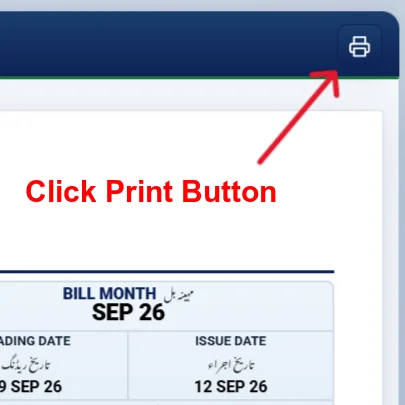
Step 2
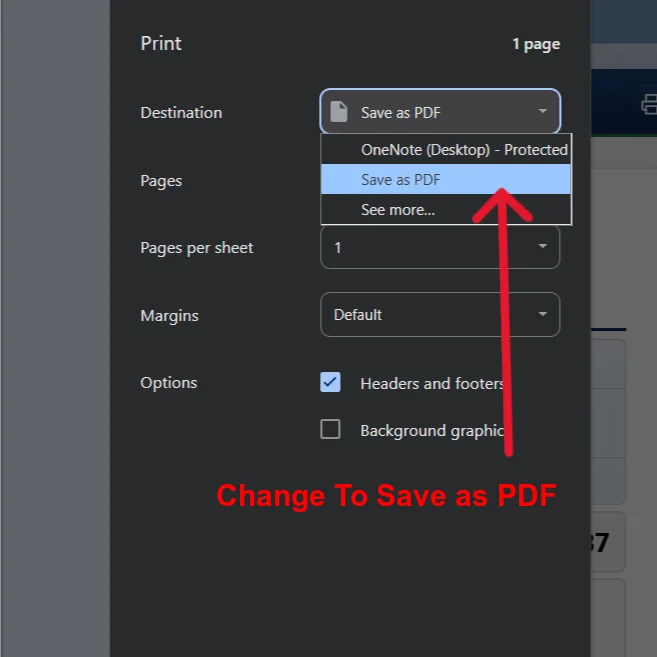
Step 3
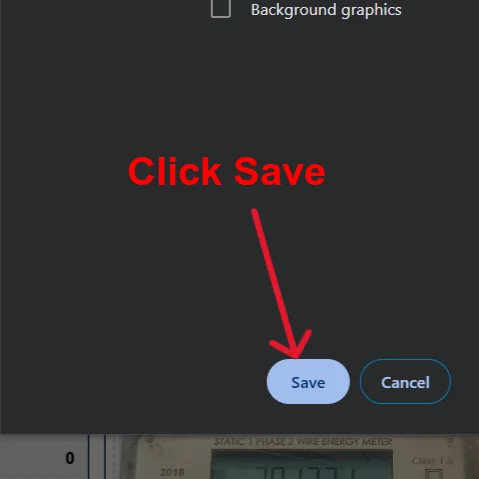
Step 4
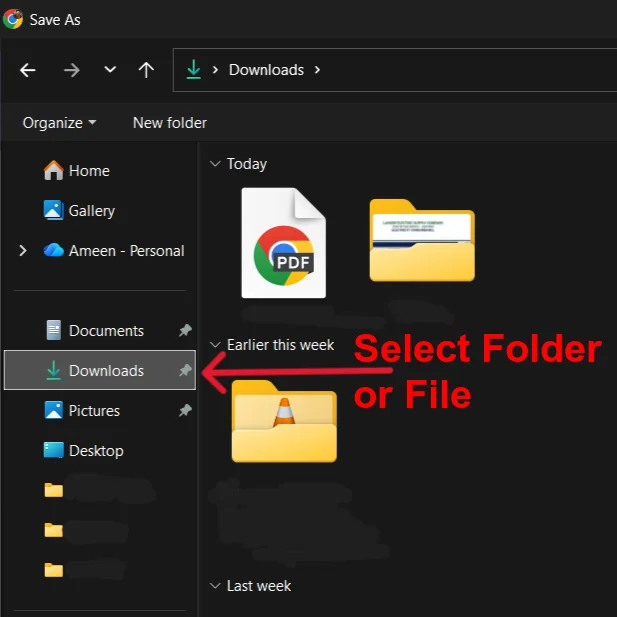
Step 5
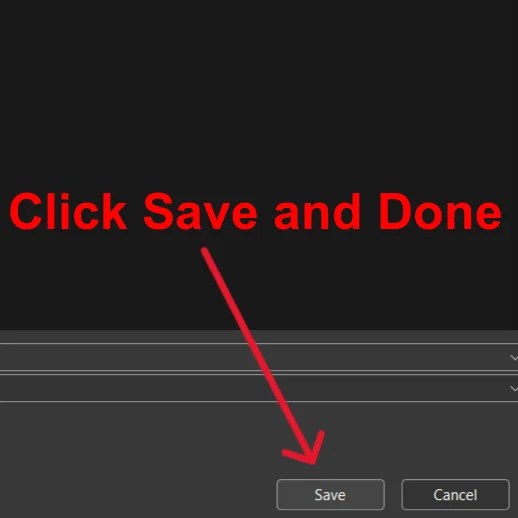
A duplicate bill downloaded this way is not a lesser or unofficial copy, it’s pulled from the exact same LESCO billing database as your original mailed bill, and it carries identical unit readings, charges, and reference details. Banks, embassies, and government offices in Pakistan routinely accept a printed duplicate bill as proof of address for exactly this reason.
💡Tip: If the PDF fails to generate, try switching browsers first (Chrome tends to be more reliable than in-app browsers on some Android phones), or clear your browser cache before retrying.
LESCO Bill Detailed Explanation
A LESCO bill packs a lot of information into one page, and most of it matters if you’re trying to spot an error or understand why your amount changed.
Reading the Bill Sections
LESCO Bill Taxes and Surcharges Explained
Four line items confuse most consumers:
📝Note: None of these are LESCO-specific overcharges, they’re NEPRA-mandated adjustments applied the same way across all Pakistani DISCOs, so you’ll see identical line items on a FESCO or MEPCO bill too.
Consumer Categories: Protected, Lifeline, and Unprotected
LESCO classifies residential consumers into three tiers based on monthly units consumed:
Your bill states your category directly, usually near the tariff or slab information in the charges section, so you don’t have to calculate it yourself.
Peak and Off-Peak Hours for Time-of-Use (ToU) Meters
If you’re on a Time-of-Use tariff, typically industrial or commercial connections with sanctioned loads above a certain threshold, your bill separates consumption into peak and off-peak windows. Peak hours generally run from 6 PM to 10 PM in winter and 6 PM to 11 PM in summer, though the exact seasonal windows are set annually by NEPRA and printed on the back of ToU bills.
💡Tip: Off-peak electricity is billed at a lower per-unit rate, so shifting heavy machinery or appliance use outside the peak window can meaningfully reduce your total.
How Do You Pay Your LESCO Bill?
LESCO bills can be paid through more channels than most consumers realize.
JazzCash and Easypaisa
A digital receipt is generated immediately, save it, since it’s the fastest proof of payment if there’s ever a dispute.
Online Banking and Raast
If your bank offers internet banking or a mobile banking app, look for “Utility Bill Payment” in the menu, select LESCO, and enter your Consumer ID. Raast, the State Bank of Pakistan’s instant payment system, is increasingly integrated into these flows too, letting you pay directly from your bank account without wallet top-ups or transaction delays.
📝Note: Payments through any channel typically reflect in LESCO’s system within 24 to 48 hours. If your bill still shows as unpaid after two full business days, keep your payment receipt and call 118 rather than paying again.
LESCO Bill Calculator: Estimate Your Bill Before It Arrives
A bill calculator lets you estimate your payable amount by entering your units consumed and consumer category, using the current NEPRA-notified tariff slabs. This is especially useful mid-month if you want to gauge how a new appliance, like an air conditioner or a second refrigerator, will affect your next bill before it actually arrives.
How to Estimate It Yourself
Most online calculators automate this math and also add estimated GST and surcharges, giving a closer real-world figure than a manual slab calculation alone.
LESCO Net Metering: Solar ROI and How to Apply
Net metering lets solar panel owners sell excess electricity they generate back into the LESCO grid, offsetting future bills instead of just powering their own home.
📝Note: Payments through any channel typically reflect in LESCO’s system within 24 to 48 hours. If your bill still shows as unpaid after two full business days, keep your payment receipt and call 118 rather than paying again.
How the Application Process Works
What It Costs
Whether net metering pays off depends on your average daily consumption, your system size, and how much surplus you actually export versus use yourself. As a rough guide, a household consuming 800 to 1,000 units a month with a well-sized 5 kW system typically recovers the hardware cost within 3 to 5 years through bill offsets, though your actual payback period will vary with sunlight hours, panel efficiency, and how LESCO’s export tariff is set that year.
How Do You Track LESCO Bill History and Spot an Overcharge?
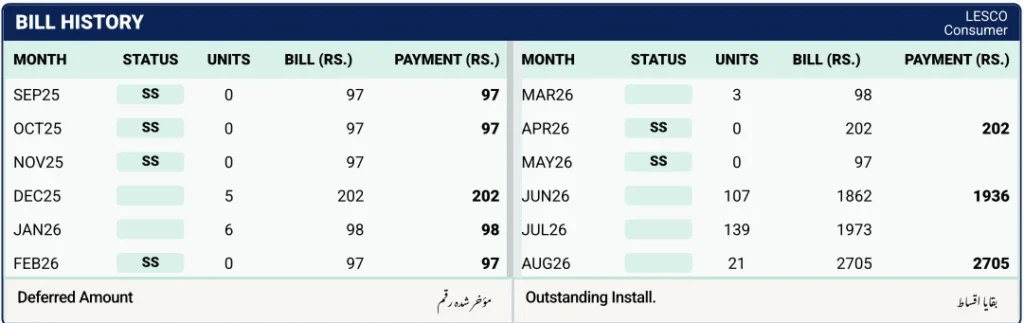
The 12-month payment history table on your bill, or the extended history view on the tool above, is the single best way to catch a billing error before you pay it.
How to Check for an Overcharge
What It Costs
Whether net metering pays off depends on your average daily consumption, your system size, and how much surplus you actually export versus use yourself. As a rough guide, a household consuming 800 to 1,000 units a month with a well-sized 5 kW system typically recovers the hardware cost within 3 to 5 years through bill offsets, though your actual payback period will vary with sunlight hours, panel efficiency, and how LESCO’s export tariff is set that year.
⚠️Warning: If this month’s units jumped 30% or more over your seasonal average with no real change in your household’s appliance use, call 118 or visit your local Customer Services Centre and request a meter reading verification before the due date. LESCO can hold or adjust a disputed bill while it investigates, but only if you raise it before payment, not after.
LESCO Mobile Apps: Which One Should You Use?
⚠️Warning: Treat any payment feature inside a third-party app with the same caution you’d apply to any unofficial financial tool: check reviews, permissions requested, and whether it actually redirects you to a real bank or wallet gateway rather than collecting payment directly.
LESCO Load-Shedding Schedule: How to Check Your Feeder Timing
Load-shedding in LESCO’s coverage area is applied feeder-by-feeder rather than uniformly across the whole city, meaning your neighbourhood’s outage schedule can differ from a street two kilometres away. Your feeder code is usually printed on your bill or known to your local Sub-Divisional Officer (SDO) office. LESCO periodically publishes updated load-shedding schedules by feeder and grid station on its official website and through local SDO offices.
💡Tip: Check directly with your SDO if you need real-time accuracy, since schedules shift with seasonal demand and system losses in a given feeder area.
Troubleshooting: Why Won’t My LESCO Bill Load?
“No Record Found” Error
Almost always means a digit was mistyped. Recount the reference number directly off the bill rather than from memory, and double-check whether the trailing U or R letter is required.
Meter Number, CNIC, or Name Doesn’t Work
This is expected, not a bug. LESCO’s public bill-check system only indexes records by Consumer ID and reference number, for privacy reasons, so none of those other identifiers will pull up a bill.
PDF Won’t Download
Usually a browser issue rather than a LESCO server issue. Try a different browser, disable any ad blocker temporarily, or switch from an in-app browser (like the one inside Facebook or WhatsApp) to your phone’s default browser.
Bill Shows as Unpaid After Payment
Give it 48 hours to reflect in LESCO’s system before assuming something went wrong, and keep your payment receipt as proof if you need to escalate through 118.
Comparison Table: Choosing the Best Way to Check Your LESCO Bill
Method | Accessibility | Speed | Convenience | Notes |
Official Website (lesco.gov.pk) | Any device with internet | Instant | High | Most reliable, always current data |
LESCO Light App | Android & iOS | Instant | High | Adds complaint filing and tracking |
SMS to Shortcode | Any basic phone | ~1–2 min | Medium | No internet needed |
Helpline (118) | Any phone | ~2–5 min | Medium | Best for disputes and verification |
Customer Services Centre | In-person | ~5–10 min | Medium | Best when documents are needed |
So, the official website is the best method for a routine LESCO bill check, because it’s free, instant, gives you a direct download link, and doesn’t depend on network coverage the way SMS does or waiting in line the way an in-person visit does. Keep the helpline and SDO visit in your back pocket for anything the website can’t resolve, like a genuine billing dispute.
Tips for Managing Your LESCO Bill
About Lahore Electric Supply Company
LESCO, short for Lahore Electric Supply Company, distributes electricity across:
Lahore
Kasur
Sheikhupura
Okara
Nankana Sahib
Whatever your connection type, from a small home in Lahore’s older neighbourhoods to a tube well in Okara’s farmland, your bill is worked out from the same set of NEPRA-approved slab rates, consumption tiers, and fuel price adjustments, with the billing month, due date, and units consumed printed clearly on every copy.
The tool at the top of this page reads that same official record straight from the PITC billing platform, so the bill you see here is the real LESCO bill, not a recreated estimate. Beyond the payable amount, it also shows your arrears, FPA charges, and applicable taxes, so you know exactly what you owe before the due date, and where to take it if something needs correcting, whether that’s a billing complaint, a meter fault, or a new connection request at your nearest sub-division office.
LESCO Bill Check Compared to Other Pakistani DISCOs
LESCO shares its core bill-check system with Pakistan’s other 10 electricity distribution companies, all running on the same PITC billing infrastructure:
IESCO (Islamabad)
HESCO and SEPCO (Sindh)
FESCO (Faisalabad)
GEPCO (Gujranwala)
PESCO and TESCO (KPK)
QESCO (Balochistan)
MEPCO (Multan)
If you manage properties or family accounts across more than one of these regions, the process is identical everywhere: same 14-digit reference number format, same portal structure, same payment channels.
📝Note: K-Electric, which serves Karachi, operates independently of the PITC network and has its own separate bill-check portal and app.
Answering your Every Question
Pick the next step that matches your question
Frequently Asked Questions
Final Thoughts
If you only remember one thing from this guide, make it this: your 14-digit reference number is the key to almost everything LESCO-related online, checking your bill, downloading a duplicate, and even pre-filling a QR scan. Keep it saved somewhere you can find in ten seconds, and the rest of this process, checking, downloading, comparing, and paying, takes less time than it did to read this sentence. I really do recommend using the tool at the top of this page for the actual bill lookup itself, it’s free, direct, pulls from the same database as lesco.gov.pk, and doesn’t ask for anything beyond the number already printed on your bill. Save the helpline and SDO visit for when something looks genuinely wrong, not as your default first step.