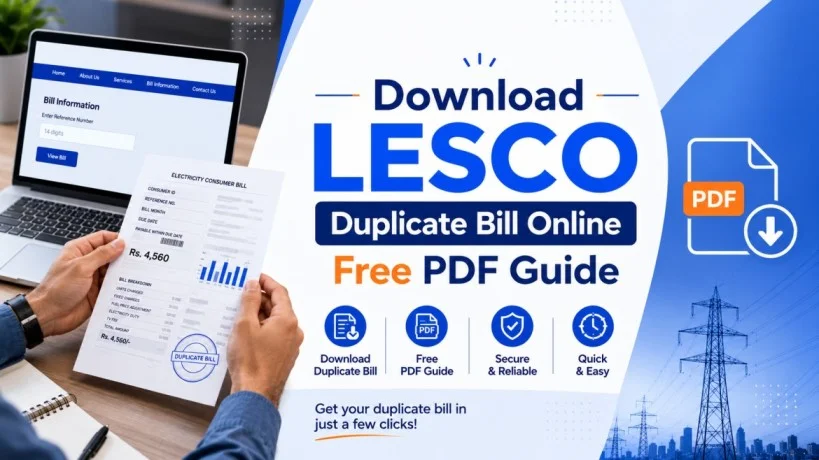
How to Download LESCO Duplicate Bill Online: Complete Guide for Pakistan
You lost your LESCO electricity bill. Or it arrived too late. Or the original is damaged and you need a copy for school admission, bank verification, or tenancy proof. Whatever the reason, getting a duplicate LESCO bill online is faster and easier than visiting a customer service center. In just 2-3 minutes, you can download a duplicate copy identical to the original bill—completely free, from home, using only your reference number. This guide explains exactly how to get your LESCO duplicate bill online, what it’s used for, and how to print or submit it properly.
What is LESCO Duplicate Bill and Why You Need It
A LESCO duplicate bill is an exact digital copy of your official electricity bill issued by Lahore Electric Supply Company. It contains identical information to the original paper bill you receive at your home—nothing more, nothing less.
Why you might need a duplicate:
Bill Lost or Misplaced:
Your original bill got lost, thrown away by mistake, or is no longer available. Instead of waiting another month for the next billing cycle, you retrieve the duplicate online immediately.
Bill Arrived Late:
Paper bills sometimes arrive 3-5 days after the due date. If your bill’s due date has passed, you can’t delay payment. A duplicate bill accessed online before the paper copy arrives allows you to pay on time and avoid late surcharges.
Bill Damaged or Unreadable:
Water damage, ink bleeding, or wear makes your bill impossible to read. A duplicate bill printed from the online system is clear, legible, and officially valid.
Document Submission Required:
Banks, schools, offices, and landlords sometimes ask for a utility bill to verify your address. A duplicate bill is legally accepted as proof of residence, address verification, and consumer identity.
Multiple Accounts to Track:
If you manage multiple properties or connections, getting online duplicates for all of them is easier than collecting physical copies.
Record-Keeping:
Some consumers prefer maintaining digital copies for tax purposes, expense tracking, or annual records. A duplicate bill can be saved on your computer or phone indefinitely.
Is a Duplicate Bill Exactly the Same as the Original? Critical Facts
Yes. A LESCO duplicate bill is 100% identical to your original paper bill. This is officially confirmed by LESCO and PITC (Power Information Technology Company).
What appears on both:
- ✅ Your 14-digit reference number
- ✅ Consumer name and registered address
- ✅ Meter number and meter readings
- ✅ Billing month and billing date
- ✅ Units consumed in kilowatt-hours (kWh)
- ✅ Energy charges and all taxes (FPA, GST, Income Tax, FC Surcharge, etc.)
- ✅ Total payable amount
- ✅ Payment due date
- ✅ Late payment surcharge (if applicable)
- ✅ Previous month’s arrears (if any)
- ✅ Government seals and LESCO official stamp/number
Both are equally valid for:
- Bank address proof
- School admission documents
- Tenancy/rental verification
- Office employee records
- Government application forms
- Insurance claim documentation
- Tax filing purposes
- Bill payment at banks or collection centers
There is zero difference. LESCO does not mark duplicate bills with any “DUPLICATE COPY” watermark or disclaimer. The duplicate bill is your official electricity bill—just accessed and printed digitally instead of waiting for the paper version.
How to Download LESCO Duplicate Bill Online: Step-by-Step Guide
Follow these exact steps to get your duplicate bill in 2-3 minutes:
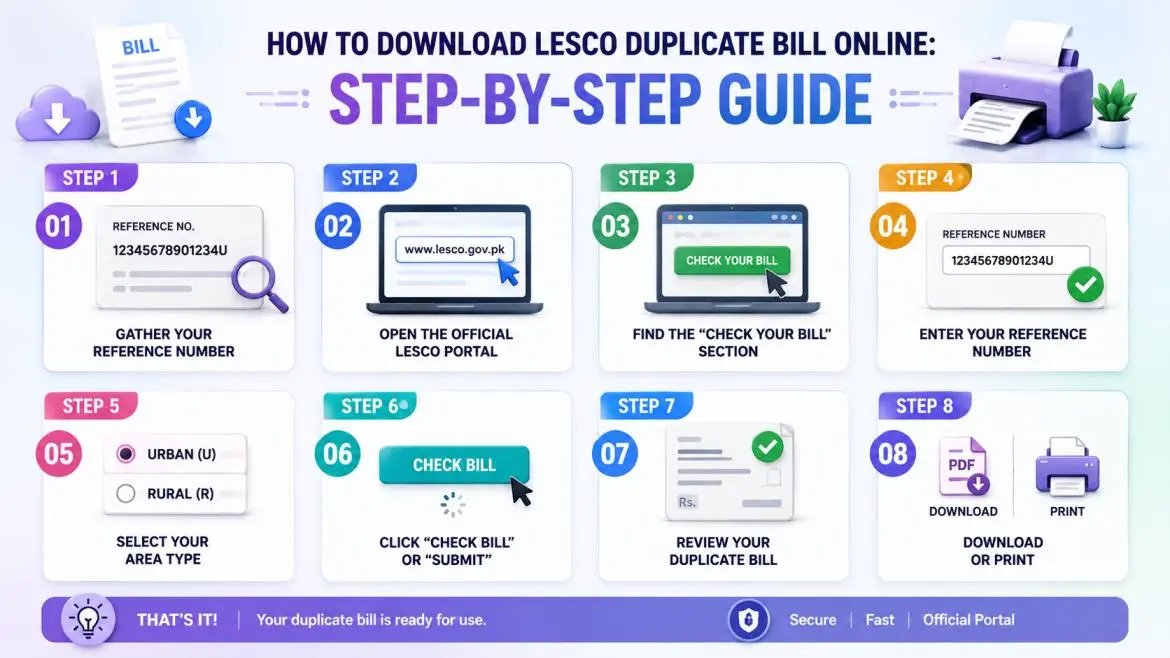
Step 1: Gather Your Reference Number
Your reference number is a 14-digit code printed on any previous LESCO bill. Look on the top-left corner of the bill under the heading “Reference No.” or “Account Number.” It looks like: 12345678901234U (with U or R at the end).
If you don’t have a previous bill, call LESCO helpline at 118 (toll-free) with your CNIC and address. They provide your reference number over the phone.
Step 2: Open the Official LESCO Portal
In your web browser, type: www.lesco.gov.pk or www.lesco.com.pk
Both links work identically and connect to the official PITC billing system.
Step 3: Find the “Check Your Bill” Section
On the homepage, look for a prominent button or link labeled:
- “Check Your Bill”
- “Online Bill Check”
- “Duplicate Bill Download”
Click it to proceed to the bill retrieval form.
Step 4: Enter Your Reference Number
In the input field, type your 14-digit reference number exactly as it appears on your bill:
- No spaces
- No dashes
- Include the final letter (U or R)
- Double-check before submitting
Even one incorrect digit will prevent your bill from loading.
Step 5: Select Your Area Type
Choose:
- Urban (U) if you’re in Lahore city proper or major towns
- Rural (R) if you’re in villages or agricultural areas
This helps the system locate your bill from the correct subdivision.
Step 6: Click “Check Bill” or “Submit”
The system retrieves your bill from LESCO’s database (usually 3-5 seconds).
Step 7: Review Your Duplicate Bill
Your complete electricity bill now appears on screen. Verify it shows:
- Correct billing month
- Correct consumer name
- Correct total amount
- Correct due date
Step 8: Download or Print
Two options:
Download as PDF: Click the “Download” button. This saves a copy to your device’s “Downloads” folder. Use this if you want to email the bill, save it permanently, or print it later.
Print Directly: Click “Print” or use your keyboard shortcut (Ctrl+P on Windows, Cmd+P on Mac). Your printer immediately begins printing the duplicate bill.
That’s it. Your duplicate bill is ready for use.
Common Uses for LESCO Duplicate Bill in Pakistan
A duplicate bill serves many official purposes:
| Purpose | Institution/Organization | Why They Need It | Accepted As Proof |
|---|---|---|---|
| Bank Address Proof | All Pakistani banks | Verify consumer’s address on record | Yes, address must match |
| School Admission | Primary, secondary, college | Address verification for enrollment | Yes, utility bills are standard |
| University Admission | University registration | Address proof with consumer name | Yes, widely accepted |
| Tenancy Verification | Landlord/landlady | Proof that tenant lives at address | Yes, very common document |
| Employee Address Verification | HR Department / Companies | Employee address on record | Yes, accepted by most firms |
| Government Job Application | FPSC, PPSC, NTS, other services | Address and identity verification | Yes, utility bills preferred |
| Passport Application | Pakistan Passport Office | Address proof for new/renewal passport | Yes, accepted along with other docs |
| Tax Filing (FBR) | Federal Board of Revenue | Address proof for business/professional records | Yes, for tax registration |
| Insurance Policy | Insurance companies | Address verification for policy issue | Yes, required by most insurers |
| Visa Application | Foreign embassy/consulate | Address proof for visa documentation | Yes, often required |
| Business Registration | SECP, provincial registration | Proof of business address for registration | Yes, widely used |
| Bank Account Opening | Banks | Address proof for new account | Yes, one of primary docs |
| Internet Service Provider | ISP companies | Address verification for new connection | Yes, standard requirement |
Important: The address on your bill must match the name and address you’re claiming. If address doesn’t match, the bill cannot serve as verification. For example, if your bill shows “Model Town, Lahore” but you claim to live in “Defence, Lahore,” the bill won’t be accepted for address proof.
How to Print Your LESCO Duplicate Bill Properly
Printing Options:
Option 1: Print from the Online Portal
- After your bill appears on screen, click “Print”
- Select your printer from the dialog box
- Click “Print” again
- Bill prints in standard A4 size
Option 2: Download First, Then Print Later
- Click “Download PDF” on the portal
- Bill saves to your Downloads folder
- Open the PDF file anytime
- Click Print icon or use Ctrl+P
- Select printer and print
Option 3: Print Using Browser Shortcut
- When bill appears on screen, press Ctrl+P (Windows) or Cmd+P (Mac)
- Select your printer
- Click “Print”
- Done in 10 seconds
Pro Tips for Official Submission:
- Print on white A4 paper (standard office paper works)
- Use black and white printing (color not required)
- Print on one side of the page only
- Don’t crop or edit the bill after printing—use the full page as-is
- Keep margins intact (don’t trim edges)
- Use clear, legible printer (check ink levels if text appears faded)
- Keep multiple copies (print 2-3 copies and keep extras)
For Bank/School Submission:
- Print 2 copies
- Submit one, keep one for your records
- Don’t staple or fold the bill
- Some institutions ask for certified copies; ask if your bill needs notarization
Online Methods to Get Your Duplicate Bill
Besides the official LESCO portal, four other fast methods exist:
Method 1: Third-Party Bill Checker Websites (Fastest)
Websites like lescobill.pk, lescobillpay.pk, and checklescobill.pk retrieve bills in 2-3 seconds. Same process: enter reference number, download PDF, print. These are authorized but not official LESCO channels.
Method 2: Mobile App
Download the free LESCO Bill app from Google Play Store or Apple App Store. Enter your reference number once, and the app saves it. Tap “Download Bill” each month to get your duplicate instantly.
Method 3: Email Service
LESCO sends bills via email if you register your email address on their portal. Once registered, you receive your bill as an email attachment each month—a PDF duplicate ready to download.
Method 4: Utility Billing Apps
Apps like Easypaisa, JazzCash, and Udhaar Book integrate LESCO billing. Open the app, enter your reference number, tap “View Bill,” and download the duplicate PDF.
Offline Methods If Online Portal Is Down
Visit LESCO Customer Service Center
Walk into any LESCO office with your CNIC (national ID card). Staff retrieve your bill on their system and print a duplicate for you immediately—completely free. Processing time: 5-10 minutes.
Main office: 22-A Queen’s Road, Lahore
Call LESCO Helpline 118
Phone 118 (toll-free, available 24/7). Provide your reference number. Staff tell you your bill amount and due date verbally, but won’t email or post the bill. Use this method only if you need information, not a printed copy.
Frequently Asked Questions
FINAL THOUGHTS
Getting a LESCO duplicate bill online is the fastest, easiest, and most cost-effective way to handle a lost, delayed, or damaged original bill. In 2-3 minutes, you have an exact copy suitable for any official use—bank submissions, school enrollment, tenancy verification, or personal records.
Remember: A duplicate bill is completely identical to your original. There’s no difference whatsoever. LESCO doesn’t charge any fee, and the process requires only your 14-digit reference number.
Save your reference number in your phone contacts so you always have it ready. Bookmark the official LESCO portal (www.lesco.gov.pk) for quick access each month. And if the online portal ever fails, you have three backup options: customer service center visit, helpline call, or mobile app download.